

You bought your first smart bulb. You opened the Home app. Everything worked fine at home. Then you left for work and tried to turn off the lights from your office. Nothing happened.
That is when most people hit the same wall.
You need a hub.
What does a hub actually do?
Let me break it down simply. The hub is like the bridge between your phone and your smart devices when you are not home.
Apple Support explains it clearly. A hub lets you control your HomeKit and Matter accessories remotely. It also runs your automations even when your phone is not home.
Without a hub, you can only control devices when you are physically on the same Wi-Fi network. That defeats the whole point of a smart home sometimes.
One Reddit user put it this way:
“No need to get the Apple TV. The HomePod mini has been 100% reliable.”
Do you actually need one?
Here is the honest answer. It depends on what you want to do.
If you just want to turn lights on and off while you are sitting on your couch, you do not need a hub. The Home app works fine on your phone within your home network.
If you want to control your home while you are away, you need a hub. If you want automations to run on a schedule, you need a hub. If you want Siri to control things when you are not home, you need a hub.
The home hub lets you access your accessories remotely and run automations even when you are not there.
What are your options?
Apple gives you four choices.
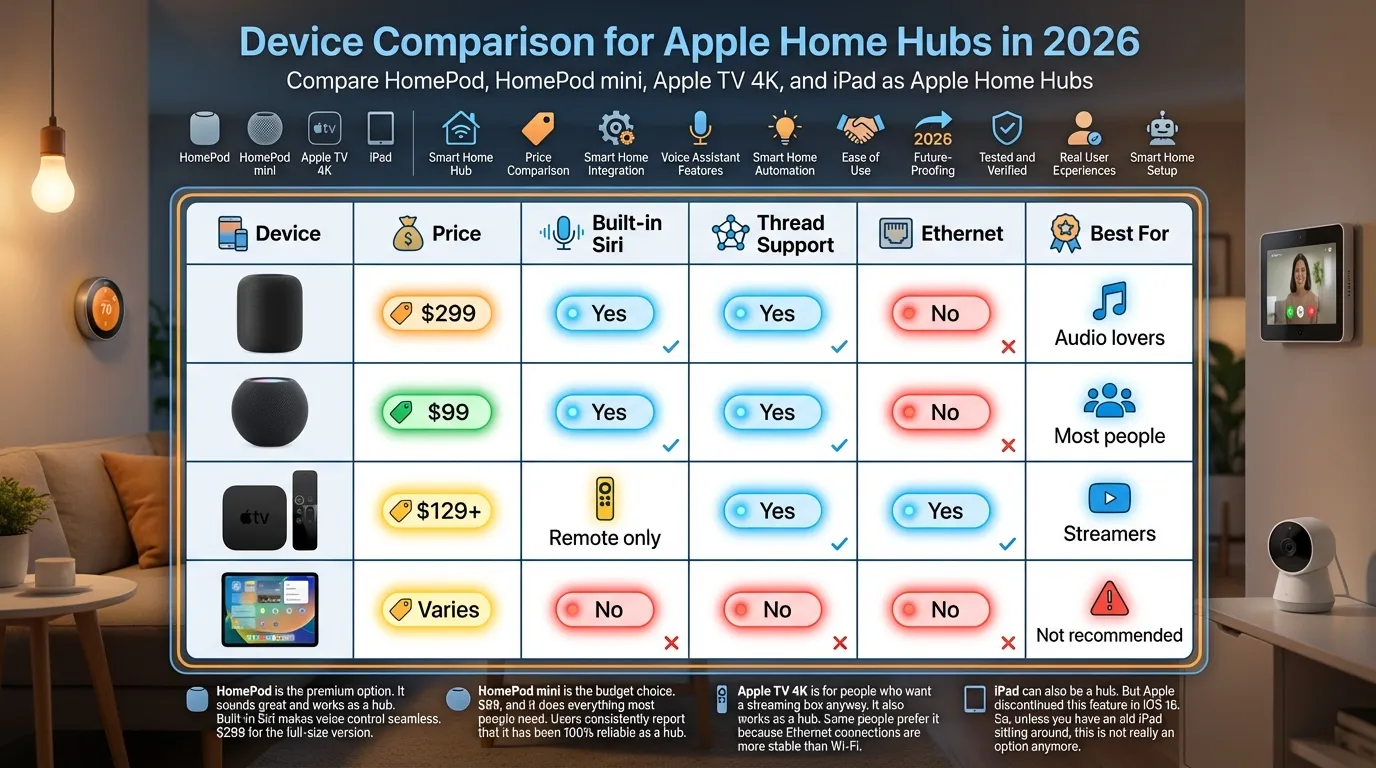
| Device | Price | Built-in Siri | Thread Support | Ethernet | Best For |
|---|---|---|---|---|---|
| HomePod | $299 | Yes | Yes | No | Audio lovers |
| HomePod mini | $99 | Yes | Yes | No | Most people |
| Apple TV 4K | $129+ | Remote only | Yes | Yes | Streamers |
| iPad | Varies | No | No | No | Not recommended |
HomePod is the premium option. It sounds great and works as a hub. Built-in Siri makes voice control seamless. $299 for the full-size version.
HomePod mini is the budget choice. $99, and it does everything most people need. Users consistently report that it has been 100% reliable as a hub.
Apple TV 4K is for people who want a streaming box anyway. It also works as a hub. Some people prefer it because Ethernet connections are more stable than Wi-Fi.
iPad can also be a hub. But Apple discontinued this feature in iOS 16. So, unless you have an old iPad sitting around, this is not really an option anymore.
HomePod vs Apple TV: Which is better for 2026?
Here is the thing. Both work equally well for core hub functionality. HomeKit UK notes that when it comes to basic hub features, both perform equally well.
The differences start to matter when you look at the extras.
Digital Trends points out that Apple TV 4K is radically different from the HomePod mini. Apple TV is designed for streaming. HomePod is designed for audio.
Siri integration is one area where HomePod has an edge. HomeKit UK explains that HomePod has built-in Siri. Apple TV requires the remote for voice commands.
On the other hand, Apple TV 4K has an Ethernet port. This gives you a more stable and reliable connection. One Reddit user noted the wired Apple TV is technically better. But the differences are generally not huge.
Which one should you pick?
Honestly? Most people should just get a HomePod mini.
Here is why. It is $99. It sounds decent. It works as a hub without any extra effort. You plug it in, and it automatically becomes your home hub.
“Don’t let anyone talk you into buying a TV you might not need.” The HomePod mini does the job.
If you already have an Apple TV 4K, use that. No reason to buy extra hardware.
If you do not have either and you are on a budget, HomePod mini is the obvious choice.
What about Matter and Thread?
Newer smart home devices use Matter and Thread. These are newer standards that make devices work better together.
Apple Support notes that Thread-based accessories require a Thread-enabled home hub. The Apple TV 4K and HomePod (2nd generation) both support Thread. The HomePod mini also supports Thread.
So if you are buying new in 2026, any of these will handle Matter and Thread devices fine.
The bottom line
Do you need a HomePod or Apple TV as a hub for Apple Home?
Yes, if you want to control your home remotely or run automations.
No, if you only need local control while at home.
For most people, the HomePod mini is the best value at $99. It does everything you need. It works reliably. Siri is built in.
If you already have an Apple TV 4K, you are covered. No extra purchase needed.
The smart home world makes more sense when you understand the hub. Now you do.