

The Frustration Is Real
I have been there. I bought smart bulbs, a hub, and a plug. Three hours later, I was on my third app, fighting with a hub that will not connect. My smart lights are stubbornly dumb.
19% of smart home users experience setup and pairing difficulties (AHS Smart Home Survey 2024). You are not alone.
Here is the good news. 2026 is different. Matter works now. Devices actually talk to each other. And I am going to show you exactly where to start.
Why 2026 Changes Everything
The smart home market will hit $168.61 billion in 2026 (Precedence Research). Over 57% of U.S. consumers will adopt smart home tech by 2025.
Matter Protocol is the big change. Before, your Philips Hue would not talk to your Samsung hub. Now they all get along. No more brand lock-in.
Local control is trending. People choose Home Assistant over cloud services. Speed, privacy, and reliability. When your internet goes down, your lights still work.
Step 1: Choose Your Ecosystem
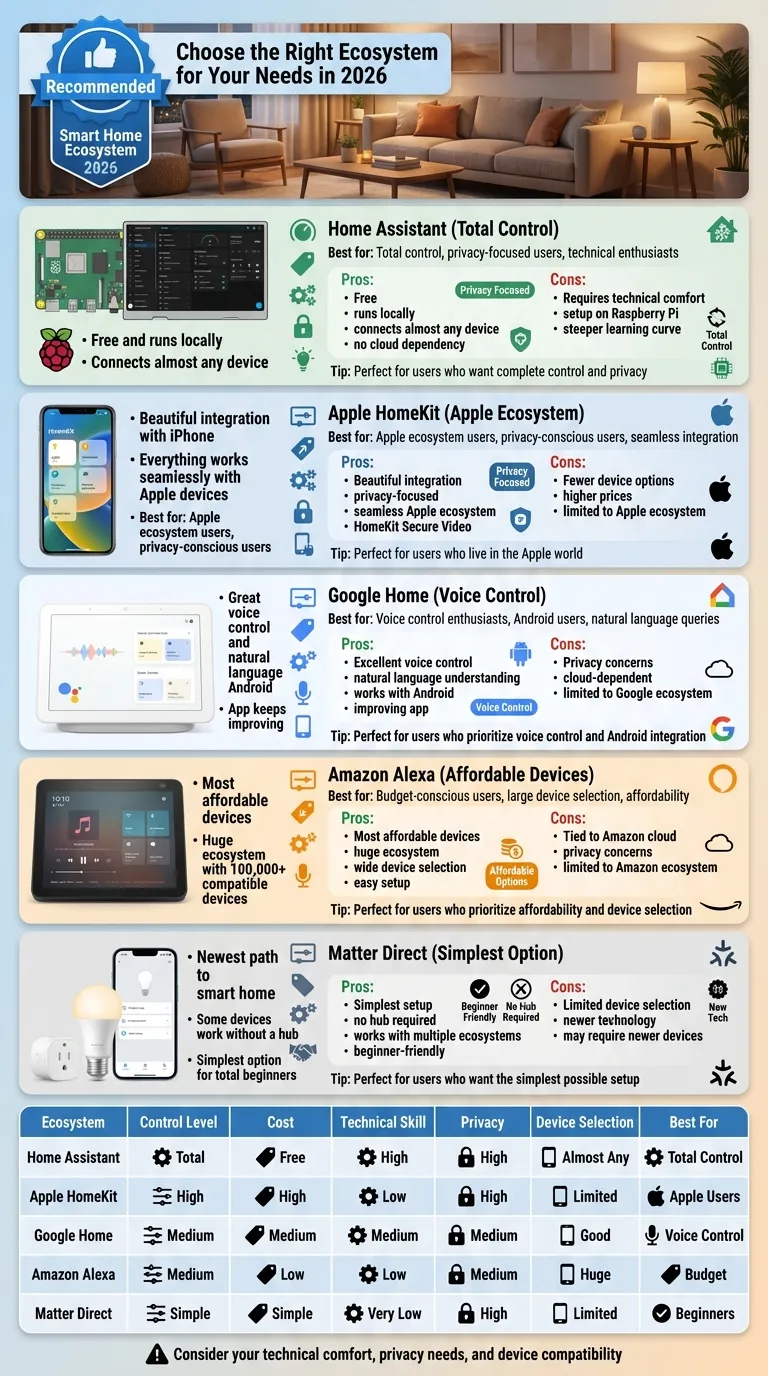
This is your most important decision. Your ecosystem controls everything.
Home Assistant is perfect if you want total control. It is free, runs locally, and connects almost any device. The tradeoff is you need some technical comfort. Set it up on a Raspberry Pi. The community is huge and helpful.
Apple HomeKit works beautifully if you live in the Apple world. Everything integrates with your iPhone. The downside is fewer device options and higher prices.
Google Home offers great voice control and works well with Android. The app keeps improving. But some users worry about privacy.
Amazon Alexa has the most affordable devices. The ecosystem is huge. If budget is your main concern, this makes sense. Just know you are tied to Amazon cloud.
Matter Direct is the newest path. Some devices work without a hub. This is the simplest option for total beginners.
| Ecosystem | Best For | Key Feature |
|---|---|---|
| Home Assistant | Tech lovers | Free, local, powerful |
| Apple HomeKit | Apple users | Smooth, secure |
| Google Home | Android fans | Great voice |
| Amazon Alexa | Budget shoppers | Cheap, huge selection |
| Matter Direct | Beginners | No hub needed |
Step 2: Fix Your Network First
Your WiFi makes or breaks your smart home. This step is not fun, but it saves massive frustration later.
A single router in one corner cannot reach everywhere. Consider mesh WiFi systems from eero, ASUS, or TP-Link. These create multiple points around your home so your signal stays strong everywhere.
Hardwire devices when you can. TVs, streaming boxes, and computers work better with Ethernet cables. This frees up WiFi for smart bulbs and sensors that truly need wireless.
Create a separate network for your smart devices. Many routers let you set up a guest network. Put all your IoT devices there. This keeps your main network faster and more secure.
| Network Problem | Solution |
|---|---|
| Weak coverage | Mesh WiFi system |
| Too many devices | Separate IoT network |
| Slow speeds | Hardwire with Ethernet |
Step 3: Buy These First ($100 Budget)
Do not buy everything at once. Start small.
A smart plug is your perfect first purchase. Plug it into any outlet, then plug a lamp or fan into it. Now you can turn that device on and off with your phone or voice. These cost around $15-25.
Next, grab a smart bulb. Philips Hue is the gold standard, but Tapo from TP-Link offers great value for less. You will be surprised how much nicer your space feels with the right lighting.
Finally, add a smart speaker. An Echo Pop or Nest Mini gives you a voice control hub. You can say turn off the lights without reaching for your phone.
These three things give you a real smart home experience for under $100.

| Device | Cost | Purpose |
|---|---|---|
| Smart Plug | $15-25 | Make any device smart |
| Smart Bulb | $20-30 | Instant experience |
| Smart Speaker | $25-50 | Voice control |
| Total | $60-105 |
Step 4: Avoid These Mistakes
Here is what goes wrong most often.
Do not buy from different ecosystems at once. Stick with one platform until you are comfortable. Mixing too soon leads to apps everywhere.
Do not ignore compatibility. Before you buy anything, check if it works with your platform. Look for Works with Matter labels.
Do not skip the network basics. Everyone wants cool cameras. But a solid network teaches you more than any gadget.
Do not automate everything day one. Start manual. Get comfortable controlling your devices. Then add automation slowly.
| Mistake | Why It Hurts |
|---|---|
| Mixed ecosystems | Apps everywhere |
| No compatibility check | Wasted money |
| Skipping network | Constant frustration |
| Too much automation | Overwhelm |
2026 Trends to Watch
A few things are shaping where smart homes are going.
Matter over Thread is gaining serious momentum. This combination makes devices respond faster and work more reliably. Expect more Thread-compatible devices hitting stores.
AI integration is getting smarter. Home Assistant now works with AI assistants that understand natural language. You can describe what you want in plain English instead of memorizing commands.
DIY is exploding. More people choose self-hosted solutions over subscription services. Nobody wants to pay monthly fees forever.
Local processing is the future. Running things locally means speed, privacy, and reliability. The idea of everything through cloud servers is fading.
Your 4-Week Action Plan
Here is exactly what to do.
Week 1: Pick one ecosystem. Research it for 30 minutes.

Week 2: Check your network. Add mesh WiFi if needed.

Week 3: Buy your first 3 devices. Set them up manually.

Week 4: Learn the app. Try voice commands. Then think about what to add next.
That is it. You do not need to be tech-savvy. You do not need thousands. You just need to start.
Get your first smart plug this weekend. You will wonder why you waited so long.
Frequently Asked Questions
What is the best smart home ecosystem for beginners in 2026?
Matter Direct is the easiest for total beginners since it requires no hub. However, Home Assistant offers the most control and value long-term if you are willing to learn.
How much does it cost to start a smart home?
You can start for under $100 with a smart plug, bulb, and speaker. Most people spend $200-500 for a solid starter setup.
Do I need a hub for smart home devices?
Not always. Some devices work directly with Matter without a hub. But hubs like Home Assistant or SmartThings help connect more devices and enable advanced automation.
What is Matter Protocol?
Matter is a universal smart home standard that lets devices from different brands work together. It launched in 2022 and became reliable in 2024-2025.
Can I build a smart home without internet?
Yes. Using Home Assistant locally means your devices work even when the internet is down. Cloud-based systems like Alexa require internet.